Music Player for Android
- 4.7
- Rating
- 50.00M
- Installs
- Free
- Price

 Analysis by App-foxy
I spend a lot of time testing music players in ordinary situations rather than only checking whether they can start a song. A useful player has to remain understandable when I am tired, distracted, using headphones, dealing with a noisy room, or trying to change the sound without accidentally making everything harsh. Music Player for Android, developed by Leopard V7, takes a straightforward local-audio approach and adds a surprisingly broad set of sound controls. It is free to install, aimed at Everyone, and currently listed as version 7.5.1 for devices running Android 6.0 or later.
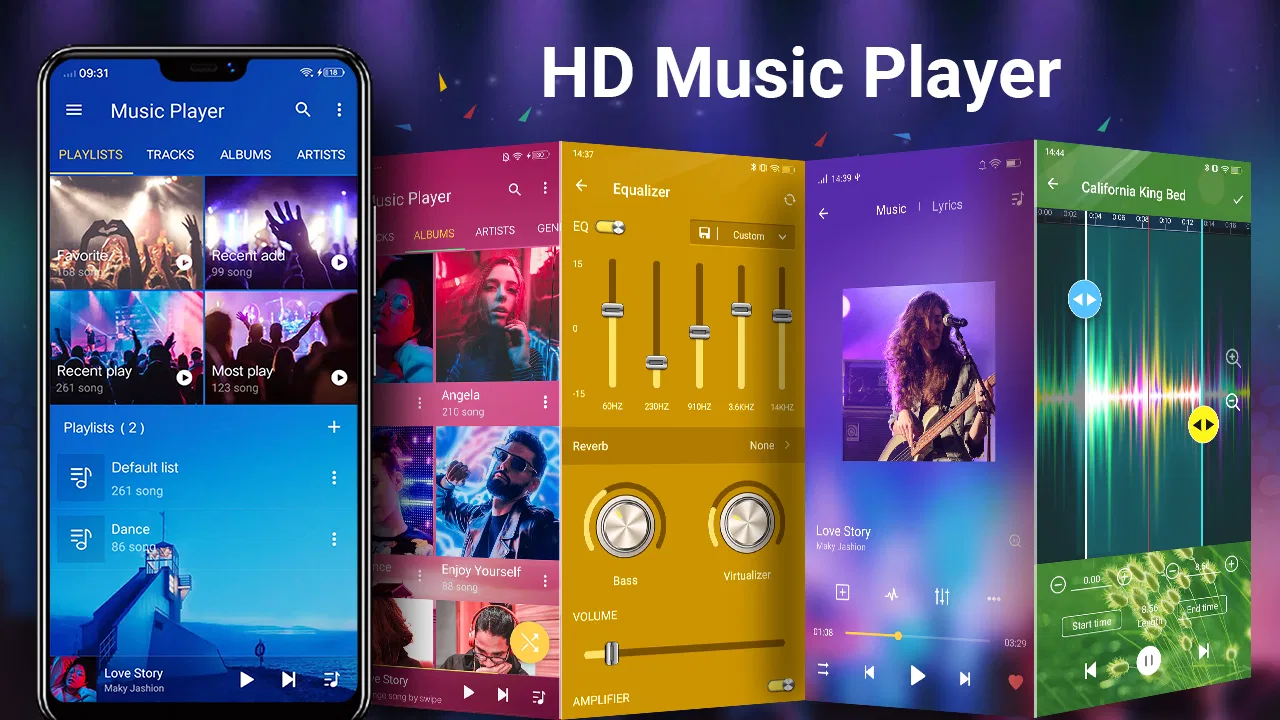
My first impression is that this is an app for people who want more control than the basic player included with a phone, but who do not necessarily want a streaming service wrapped around their music. The headline appeal is the combination of music playback, an equalizer, bass adjustment, and sound-changing tools. In practice, its strongest quality is flexibility: I can leave the interface simple while listening casually, then open the audio controls when a particular pair of headphones or a difficult recording needs attention.
How the player feels to use in everyday listening
I find the everyday experience most useful when I keep playback simple and treat sound adjustments as occasional tools, not something to revisit with every track. A small, familiar reference playlist can help me notice whether a change genuinely improves listening or merely feels impressive at first. That practical habit leads to the bigger question: whether the player still earns attention once the novelty of its controls has worn off.
You May Also Like

 Blood Strike: 2.5 Anniversary
Blood Strike’s Loadouts Turn Every Drop Into a Tactical Gamble
A close look at Blood Strike’s custom loadouts: how fast access to signature weapons reshapes its battle royale rhythm, rewards preparation, and narrows the gap between fights.

 Pandora - Music & Podcasts
Pandora’s Music Is Easy to Start, but Harder to Recover
Pandora’s strength is its low-effort path from a seed to a station. Its weak spot is how much confidence it asks you to place in connection, setup, and quiet recovery.

 8 Ball Pool
 Is Built on Rivalries, Rematches, and Routine
A close look at the rivalries, rematches, shared routines, and unanswered safety questions that turn a quick pool match into a persistent mobile community.

 Samsung Music
’s Quiet Strength Is Playing What You Already Own
Its reach comes less from spectacle than from dependable access to a personal library. That simplicity is both the app’s strongest retention engine and its ceiling.

 AccuWeather: Weather Radar
AccuWeather Review: A Quick, Clear Forecast for Everyday Decisions
For everyday plans, the best forecast is the one you can understand quickly. AccuWeather makes rain timing, radar, and local conditions easy to act on, with a few trade-offs.

 Hill Climb Racing
Why Hill Climb Racing Still Turns Crashes Into One More Run
A tiny car, a bumpy hill and one more upgrade: Hill Climb Racing keeps resurfacing because its simple chaos makes every near-miss feel personal.
More From Our News Desk
View All News


Readability and navigation
The app is easiest to understand when I treat it as a personal library player rather than as a discovery platform. I am looking for music I already have available on the device, choosing something to play, and then deciding whether the standard sound is good enough. That separation matters. People who expect recommendations, artist interviews, social listening, or a large online catalog may find the experience narrower than a streaming app. People who simply want their own tracks organized around playback may appreciate the lack of that extra purpose.
Navigation feels most comfortable when I make deliberate changes one at a time. I start with a song, listen for a moment, and then open the audio controls instead of changing several settings immediately. This makes it easier to understand what each adjustment is doing. It is also a practical habit for anyone who finds dense control screens tiring: use the player normally first, and only enter the equalizer when there is a clear reason.
The app’s popularity suggests that this basic approach works for a large audience. It has passed 50 million installs and holds a 4.7 average from roughly 393 thousand ratings, with about 11 thousand written reviews. Those figures do not replace personal testing, but they do indicate that the player has reached far beyond a small group of audio hobbyists.
For readability, the important question is not whether every control is immediately obvious. Some audio terminology assumes that the listener already knows what an equalizer or bass boost is meant to do. A newcomer can still use the player without mastering those terms, but the experience improves if changes are gradual. I would not hand this to someone who wants every option explained in plain language before touching it; I would recommend starting with playback and learning the sound tools through small experiments.
A useful routine is to keep one familiar song ready as a reference. I use a track with vocals, a steady rhythm, and a few quieter details. If a setting makes the vocal disappear or the low end become muddy, I can undo the change quickly because I know how the song normally sounds. This is more reliable than judging an adjustment from an unfamiliar recording, especially when the interface presents several audio controls together.
Motor and sensory considerations
Music Player is potentially helpful for listeners who need to shape sound around their own hearing preferences, headphones, or surroundings. The equalizer and bass controls can make a thin recording feel fuller, while a cautious adjustment can reduce the need to keep turning the overall volume up. That does not make the app a medical or hearing-support tool, and I would not use it as a substitute for professional advice. Its value is practical personalization, not diagnosis or correction.
The same flexibility can create a sensory problem if I push it too far. Bass boost may be enjoyable for a short session but tiring over time, and a sound changer can make familiar voices or instruments feel unnatural. I find the best results come from subtle changes rather than dramatic effects. When listening for a long period, I prefer a balanced profile that keeps speech and melody clear instead of chasing the strongest possible impact.
For motor comfort, the main advantage is that I can prepare the sound once and then return to ordinary playback. That reduces repeated interaction during a walk, commute, or household task. I would set the player up before leaving home, because changing several audio options while moving is less comfortable and increases the chance of selecting the wrong control. This is a small workflow change, but it makes the app feel much more manageable in real use.
People with limited dexterity should pay attention to how easily they can reach the controls on their particular phone. The experience depends on the device, screen size, display scaling, and Android setup, so I would not promise that every control will be equally comfortable for every hand. The app gives me useful audio choices, but it does not remove the physical demands of operating a touchscreen.
For listeners who are sensitive to sudden changes, I recommend testing adjustments at a low listening level first. A setting that sounds exciting for a few seconds can become unpleasant when the next track has a different mix. This is one reason I prefer changing the sound while a representative song is playing, then checking another style before keeping the profile. A setting that suits electronic music may be too heavy for acoustic recordings or spoken material.
Situational access in real life
My most convincing everyday use case is a mixed commute. At home, I may want a fairly neutral sound for albums. On public transport, background noise can hide quieter parts of a song, so I might make a modest adjustment rather than constantly reaching for the volume control. Later, when I listen to a podcast or a vocal-heavy track, I return to a clearer balance. The app is useful here because it lets me adapt playback instead of treating every listening environment as identical.
It also works well for offline personal collections, provided the music is already available to the device. That makes it a sensible choice for someone with downloaded albums, recordings, or other local tracks who does not want to depend on a catalog search. The trade-off is equally important: if your main habit is discovering new music through playlists generated by a streaming service, this player is not designed to replace that whole experience.
Another practical scenario is listening through different output devices. Earbuds, a car connection, and a small speaker rarely present music in exactly the same way. Rather than assuming one sound profile will suit all three, I would make a conservative adjustment for each situation and avoid extreme settings that become unpleasant when the output changes. The app’s audio focus is more valuable when used as a correction tool than as a permanent effects showcase.
The Everyone age rating makes the app broadly approachable from a content-classification perspective, but that should not be confused with universal ease of use. A younger listener can understand the basic player, while an older adult or someone unfamiliar with audio controls may need a short introduction. I would show that person only the essential playback actions first, then explain the equalizer later if they actually want it.
For users who listen while cooking, exercising, or doing chores, preparation is especially important. I would choose the music and sound profile before starting the activity, then rely on the simplest available playback actions. The app becomes less accessible when I expect to perform detailed adjustments with wet hands, gloves, poor lighting, or divided attention. Its controls are useful, but they are still controls on a phone screen.
What the audio tools add beyond a basic player
The equalizer is the feature that gives this app a reason to exist beside a phone’s standard music player. A basic player may start tracks perfectly well, but it usually offers little help when headphones sound too bright, vocals sit too far back, or bass feels weak. Here I can make a more personal compromise. I do not need to become an audio engineer; I can listen, make a small change, and decide whether the result is easier to enjoy.
Bass boost is appealing but deserves restraint. It can add weight to tracks that feel empty, yet too much low-end energy can cover the kick, blur bass lines, and make voices less distinct. I would use it for a specific pair of earbuds or a particular album, not leave it permanently at its strongest level. This is also a useful accessibility-minded principle: clarity is often more valuable than intensity.
The sound-changing option is more experimental. It can be fun when I want to alter the character of a track, but it is less likely to become part of my daily listening than the equalizer. I see it as an occasional creative tool rather than a reason to keep every song processed. Listeners who want faithful album playback may prefer to ignore it, while people who enjoy unusual effects may find it gives the player extra personality.
One non-obvious trade-off is consistency. Audio processing can make one song feel better while making the next one worse, particularly when albums contain different recording styles. I get better results by testing across several tracks before settling on a setting. If I am listening to a full album, I usually choose a moderate profile; if I am listening casually to one playlist, I can afford to experiment more.
Where it fits against the usual alternatives
Compared with a built-in phone player, Music Player offers a more deliberate sound-tuning experience. That makes it the better choice when the default output feels flat or when I want to adapt playback to different headphones. The built-in option may still be preferable for someone who values the fewest possible controls and wants a player that stays almost invisible.
Compared with a streaming app, this player has a different job. Streaming services are stronger for discovery, synchronized libraries, recommendations, and switching between devices. This app is more appealing when I already have music to play and care about direct control over the listening sound. Choosing it does not have to mean abandoning streaming; I can use a streaming service for discovery and keep a dedicated local player for personal files, recordings, or music that I want to manage directly.
Compared with specialist audiophile players, it is easier to approach but may not satisfy someone who wants an elaborate library system or highly technical audio workflow. I would choose this app for accessible everyday tuning, not because it promises to turn a phone into a studio. That distinction prevents disappointment: its strength is the balance between ordinary playback and extra sound controls.
Remaining barriers and sensible limits
The biggest barrier is the learning curve created by choice. More controls mean more opportunities to make a song sound worse, especially when labels are unfamiliar or when I adjust several options at once. The solution is not complicated: change one setting, use a familiar track, and keep the adjustment modest. I would also return to a neutral sound before judging a new pair of headphones, since heavy processing can hide the headphones’ actual character.
Another limitation is that the app cannot solve every situational problem. If a place is extremely noisy, increasing bass or applying effects may not improve intelligibility and may simply encourage louder listening. In that case, a quieter location or better-fitting headphones are a more sensible answer. Likewise, listeners who need formal accessibility features, specialized hearing assistance, or highly simplified controls should evaluate the app on their own device before relying on it.
In-app purchases range from $0.99 to $9.99 per item, so I would check which optional functions matter to me before spending anything. The app itself is free, which makes trying the basic experience relatively low-risk, but free installation does not mean every possible enhancement is included without charge. I prefer to use the ordinary player first and only consider an optional purchase if it solves a problem I actually have.
Device compatibility is another practical checkpoint. The listed minimum is Android 6.0, so users on older phones should not assume it will install. On supported devices, the final experience can still vary with the phone’s audio hardware, Android version, headphones, and other audio processing active on the system. If music sounds strange, I would first check for competing sound effects before blaming the player itself.
Leopard V7 has kept the app in circulation since its release on October 7, 2012, and the current version is 7.5.1. That long presence is reassuring for people who want an established player rather than a brand-new experiment, although longevity alone does not guarantee that its interface will match every modern Android habit. I would judge it by whether the current controls feel comfortable on my phone, not only by its history.
My inclusive verdict
I recommend Music Player for Android to listeners who want a free local music player with meaningful sound control, especially if ordinary playback feels too limited. Its equalizer and bass adjustment can make a real difference when used carefully, and the sound-changing tools add room for experimentation without forcing that style on every song. The app is most comfortable for people willing to learn a few audio controls and prepare their preferred settings before listening in busy situations.
I would steer away from it if my priority were effortless streaming discovery, a completely minimal interface, or specialist accessibility support beyond ordinary Android interaction. It is also not the right answer to every noisy-environment problem, and stronger effects are not automatically better for comfort or clarity. Those limits are important because the app’s flexibility can be both its main advantage and its main source of friction.
Overall, I see it as a practical middle ground: more adaptable than a basic phone player, less catalog-focused than a streaming service, and less intimidating than a highly technical audio tool. The best way to use it is to treat sound adjustment as careful personalization, not a volume contest. Start with a familiar song, make one small change, test it in the situation where you actually listen, and keep only what improves clarity or comfort. For that kind of listener, Music Player earns a place on the phone without needing to do everything.
FAQs for Music Player for Android
01What audio formats does the Music Player support?
The Music Player supports a wide range of audio formats including MP3, WAV, FLAC, AAC, and more. This ensures that you can play almost any music file without the need for conversion. The app's versatility in format support makes it a convenient choice for audiophiles and casual listeners alike.
02Does the Music Player require an internet connection to function?
No, the Music Player can function entirely offline. You can listen to your downloaded music without needing an internet connection. However, features like online radio or music streaming within the app will require a stable internet connection to access external content.
03Are there any customizable features in the Music Player?
Yes, the Music Player comes with several customizable features. Users can create and manage playlists, adjust equalizer settings to enhance sound quality, and personalize the app's interface with themes and skins. These features allow users to tailor their listening experience to their preferences.
04Is the Music Player free to use, or does it contain in-app purchases?
The basic version of the Music Player is free to download and use. However, it may offer in-app purchases for additional features such as an ad-free experience, premium themes, or advanced audio effects. Users can choose to upgrade according to their needs and preferences.
05How does the Music Player manage and organize music files?
The Music Player automatically scans and organizes music files on your device. It categorizes them by artist, album, genre, and playlists, making it easy for users to access their favorite tracks. The app also supports metadata editing, allowing users to update song information for better organization.
Pros
- Easy-to-use interface with intuitive controls.
- Supports a wide range of audio formats.
- Customizable themes to match your style.
- Offline playback for no data usage.
- Equalizer with presets for enhanced sound.
Cons
- Contains ads that can interrupt playback.
- Limited features in the free version.
- No option for lyrics integration.
- Occasional crashes on older devices.
- Lacks advanced playlist management.

Music Player for Android
Gallery